
Appearance
Schedule Based Features
Below features are triggered based on cron expression. All features are Team based. Some features are only applicable to a user's Main Team (the first registered Team), see Notification Targets for details.
WARNING
- Features can be configured by instructions here
TIP
The time zone can be set as your local time zone, so the time in cron express is just local time.
You can generate cron expression here https://www.freeformatter.com/cron-expression-generator-quartz.html, or from other cron related tools.
You can get to know about country code here: https://en.wikipedia.org/wiki/ISO_3166-1_alpha-2#Officially_assigned_code_elements.
Global Holiday
Description: Notify holidays of global for the day, so that you are determine whether to disturb customers.
Triggered by: example cron 0 15 7 ? * *
Enabled by Default?: False
Notification Target:TA & SE. Main Team Only.
Samples: 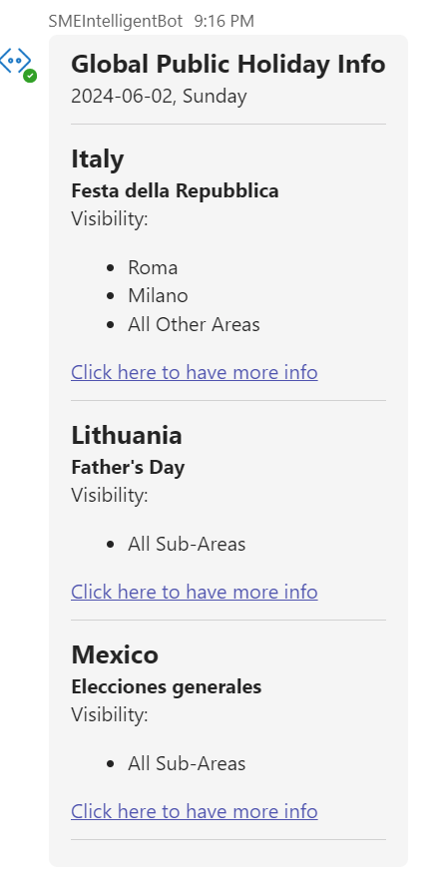
Config:
Config Details:
countries: a list of country codes. Keep it empty for all global countries.
json
{
    "countries":["CN","AU"]
}
INFO
- Source of the holiday information is from https://holidays.microsoft.com.
- Minimum interval of the cron job is 24 hours.
ARR Critsits in Queue
Description: Notify when there is a new ARR Crisits reaching in queue.
Triggered by: example cron 0 0/3 7-17 ? * 2-6
Enabled by Default?: False
Notification Target:TA. All Registered Teams applicable.
Samples:

Config:
Config Details:
queue_guids: the routing context id of you queue name.product_filters: only notify on specific products. Leave it blank for all products.recipients: If you want only notifyTAthen set tonot all. If you want to notify everyone in your Team, set toall.
json
{
    "queue_guids":["0bb7e088-e261-e911-8140-00155d895b16","second-queue-id"],
    "product_filters":["Data Explorer","Cosmos DB"],
    "recipients":"not all"
}
INFO
- You can lookup your queue GUID here : https://msaas.support.microsoft.com/queue
- Minimum interval of the cron job is 3 mins.
Cases SLA in Queue
Description: Notify when there is a case in queue SLA <= 30 mins.
Triggered by: example cron 0 0/5 7-17 * * ?
Enabled by Default?: False
Notification Target:TA. All Registered Teams applicable.
Samples:

Config:
Config Details:
queue_guids: the routing context id of you queue name.product_filters: only notify on products specified. Leave it blank for all products.sev_filters: only notify on severities specified. Leave it blank for all sevs.service_name_filters: only notify on service names specified. You can copy-paste the exact service name from CaseBuddy-> case details page. Leave it blank for all service names.country_filters: only notify on countries specified. Leave it blank for all countries.recipients: If you want only notifyTAthen set tonot all. If you want to notify everyone in your Team, set toall.
json
{
  "queue_guids": [
    "bd07cc4d-7d3a-e711-8126-001dd8b72a0d",
    "second-queue-guid"
  ],
  "sev_filters": ["1","A","B","B247","C"],
  "service_name_filters": ["ResAccess | Cit Alliance Sup - UES","SC | ARR - UES"],
  "product_filters": ["Data Explorer","Cosmos DB"],
  "country_filters": [
    "AU",
    "KH"
  ],
  "recipients": "not all"
}
INFO
- You can lookup your queue GUID here : https://msaas.support.microsoft.com/queue
- Minimum interval of the cron job is 10 mins.
- <= 30mins is a by design, not supported for other values for now.
Cases SLA with Engineer
Description: Notify when there is a case owned by an engineer SLA <= 30 mins.
Triggered by: example cron 0 0/10 7-17 * * ?
Enabled by Default?: False
Notification Target:TA and the engineer who owns this case. All Registered Teams applicable.
Config: None
Samples:
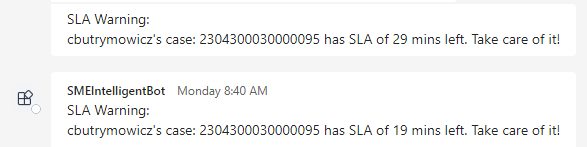
INFO
- Minimum interval of the cron job is 10 mins.
- <= 30mins is a by design, not supported for other values for now.
Wrong Cases Country in queue
Description: Notify when specific country's cases should not appear in a queue. Useful for monitoring non-global queue and if someone may misroute.
Triggered by: example cron 0 0/20 7-17 * * ?
Enabled by Default?: False
Notification Target:TA. All Registered Teams applicable.
Samples:

Config:
Config Details:
queue_guids: the routing context id of you queue name.allowed_country_filters: a list of allowed country codes. Leave it blank if you want to allow all countries, or please fill in ALL countries allowed. This takes precedence thandisallowed_country_filters, e.g. if 'CN' appears in bothallowed_country_filtersanddisallowed_country_filters, it will be treated as allowed.disallowed_country_filters: a list of disallowed country codes.recipients: If you want only notify TA then set to not all. If you want to notify everyone in your Team, set to all.
json
{
   "allowed_country_filters":["AU", "KH"],
   "disallowed_country_filters":["CN", "KO"],
   "queue_guids":["0bb7e088-e261-e911-8140-00155d895b16","second-queue-id"],
   "recipients":"not all"
}
INFO
- You can lookup your queue GUID here : https://msaas.support.microsoft.com/queue
- Minimum interval of the cron job is 10 mins.
Daily Cases Closure Summary
Description: Bring a Cases Closure Summary report.
Triggered by: example cron 0 5 0 * * ? *
Enabled by Default?: False
Notification Target:TA. All Registered Teams applicable.
Config: None
Samples:
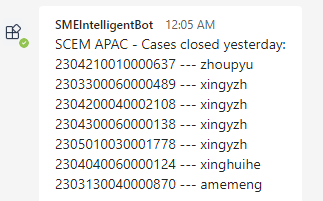
INFO
- Minimum interval of the cron job is 24 hours.
Shift Notification
Description: Notify engineers leave status per Eyes On Calendar.
Triggered by: example cron 0 15 7 ? * 2-6
Enabled by Default?: False
Notification Target: everyone. All Registered Teams applicable.
Samples:
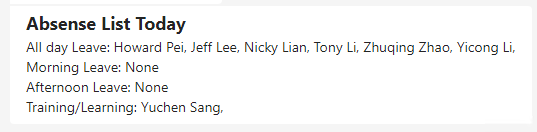
Config:
Config Details:
base_url: The base url of Eyes on Calendar.tabs: An array for the tabs on EyesOnCalendar you want to check, e.g. FTE, Vendor. Leave the array blank if you want to check for All tab.custom_date_type: a json format which you can customize your leave code status.
json
{
  "base_url": "https://eyesoncalendar.azurewebsites.net/api/APAC_AME/",
  "tabs": ["put tabs on EyesOnCalendar","leave array blank for All tab"],
  "custom_date_type": {
    "all_day_absent": ["HHTO","birthday"],
    "morning_absent": [],
    "afternoon_absent": [],
    "learning_training": []
  }
}
INFO
- Minimum interval of the cron job is 24 hours.