
Appearance
FAQ
Current Limitation
- So far TA role is designed to receive all related message regarding your team. Notification subscription feature for each user account would be considered in the future.
Known Issues
You have a TA/PTA/Manager Job Title, but after creating a new Team in Bot, it says you are not with
TArole to perform privileged actions.- This is due to you already have a
SErole in other Team(s). - Your role in bot is universal across all Teams. So you can not have a
SErole in other Team(s) and aTArole in the new Team at the same time. - You need to ask who has TA role in that Team to assign you a
TArole.
- This is due to you already have a
Bot showing Assignment Type as Manual Assignment, but in fact this is auto assigned by VDM.
- The type of assignment, e.g. Manual Assignment/VDM Auto is detected by the assignment reason in the VDM Assignment Email, see below example.
- Currently only reasons
--andVirtual Duty Manager Assignmentwill be taken as Auto Assignment, all other reasons will be taken as Manual Assignment, as the information from the email is really limited. - There could be a chance that VDM auto assigns a case with a different reason in the email (e.g. Engineer put case back to queue with reason like after hours required). In such scenario, the reason in the Assignment Email does not fall into above two, and Bot will take it as Manual Assignment.
Miss Notification from SBAManagerBot
Background
VDM is running on an end-of-life version of Dynamics. Recently, DAS has migrated to a new Cloud instance of VDM, running on a current version of Dynamics. This migration breaks some features of SME Bot that relies on.
Impacts to SME Bot
Only Case Assignment Notification is impacted, since the previous subscriptions are not migrated, and the sender of the email noticiation has changed.
Action you need to take
- Re-Subscribe assignment notification for all your engineers in your Team. Please see details here.
- Re-Configure the email forward Logic App
- If you previously already have a Logic App configured to forward emails to SME Bot, Please go to your Logic App, in the "When a new email arrives (V3)" trigger, add
sbamanager@microsoft.comto the "From" section, and save.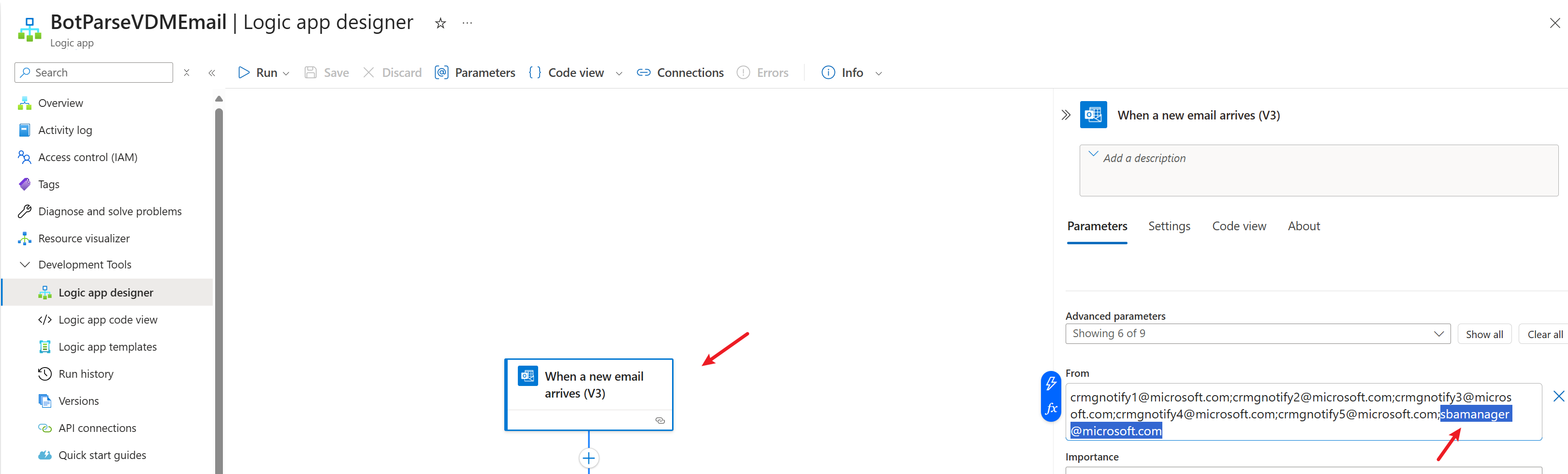
- If you have not yet set up a Logic App to forward email to SME Bot, please see details here.
Bot Migration Guidance (2024.12.17)
TIP
If you have never installed SME Intelligent Bot on Teams, then you don't need to migrate.
Background
Due to Secure Future Initiative (SFI) - Delete Multi-tenant application in FDPO tenant, multi-tenant AAD app is no longer allowed in MSFT Non-Production Tenant and will be forcely deleted by 19 Dec.... This is affecting Bot functionality as per authentication requirement of Bot Connector.
To comply with the current security management requirements, I have to deprecate the original AAD App and redirect the bot handler to a new AAD App in MSDN tenant environment. However, since the Bot is point to the old AAD app in its manifest, this operation will cause the previously installed smeintelligentbot in Teams to become unusable, specifically including:
- Inability to talk to the Bot
- Inability to receive any proactive messages from Bot (assignment notification, SLA notification, etc.)
I hope moving AAD App to MSDN tenant could prevent such things from happening in future, but really depends on if further SFI will still affect Bot's functionality. Let's go and see...
Actions Needed from users
As a widely beloved bot, in order to minimize the impact on everyone, this migration will take place on Tuesday, 2024-12-17. Here are the steps you need to take after receiving the announcement in the Bot:
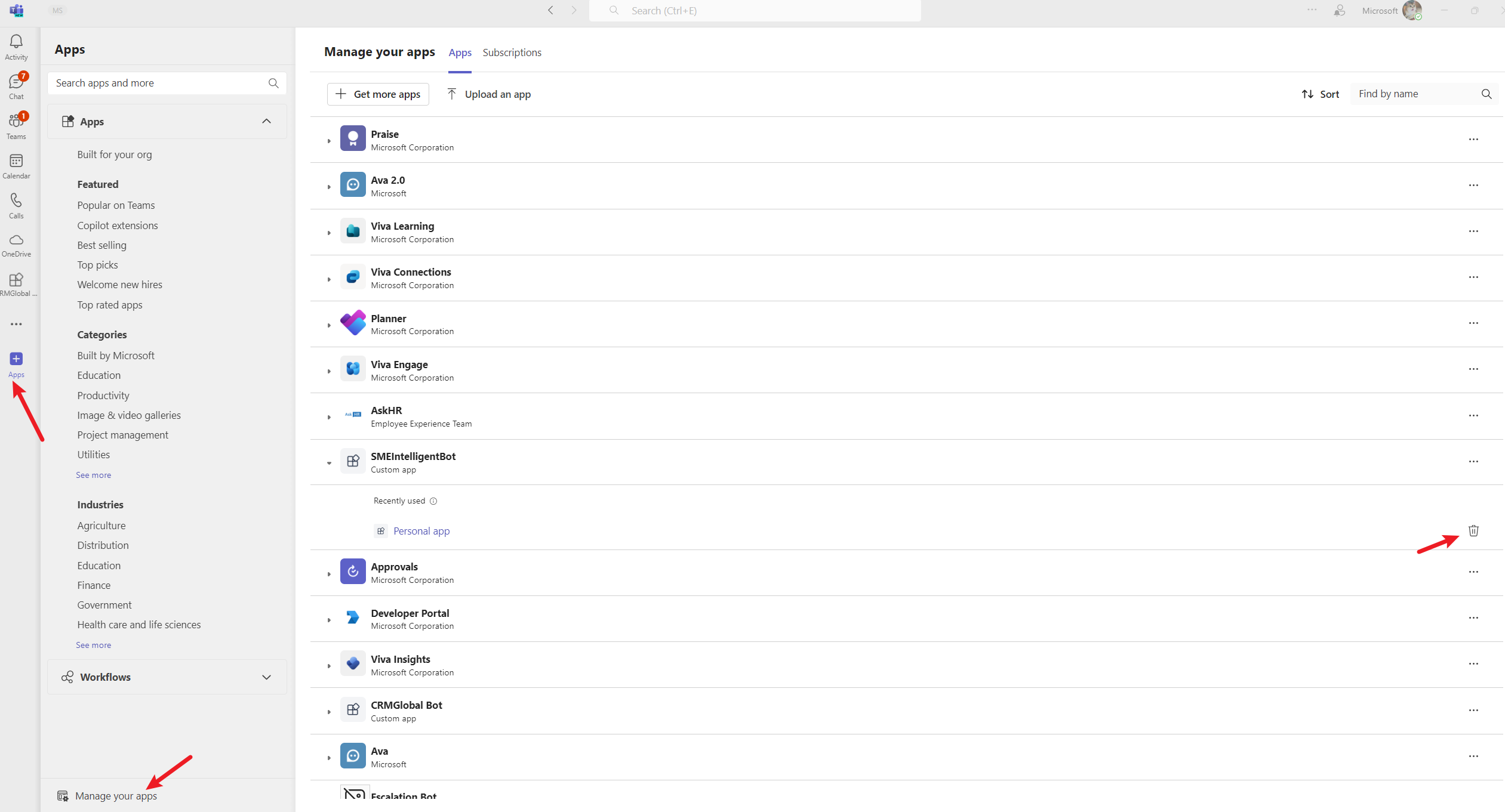
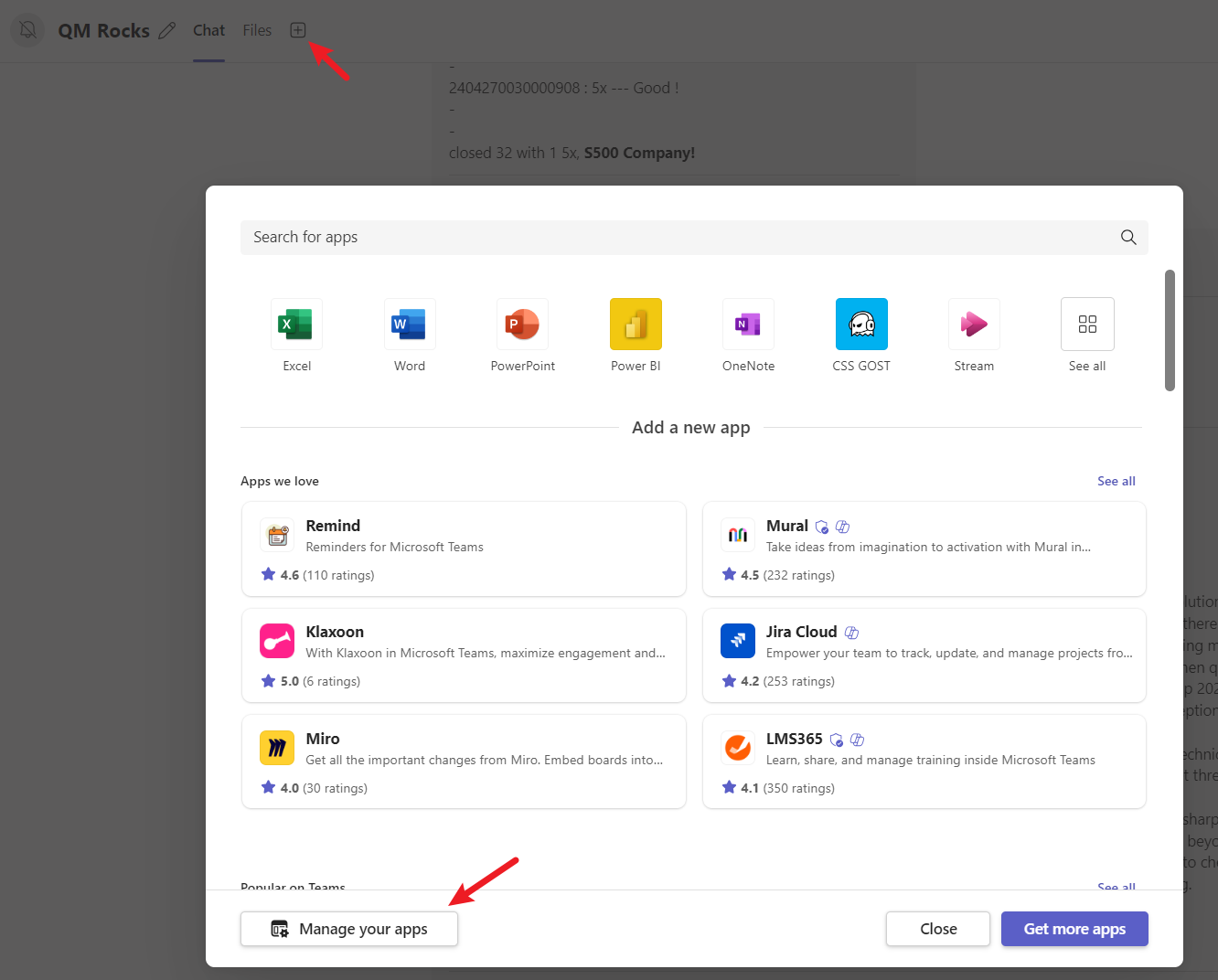
- Uninstall the Bot from Teams
Uninstall from private chat (every user should perform this, skip if you've not installed zip but from URL.)
Uninstall from group chat/channel (only needs to be done once for each groupchat/channel, recommended to be done by the TA)
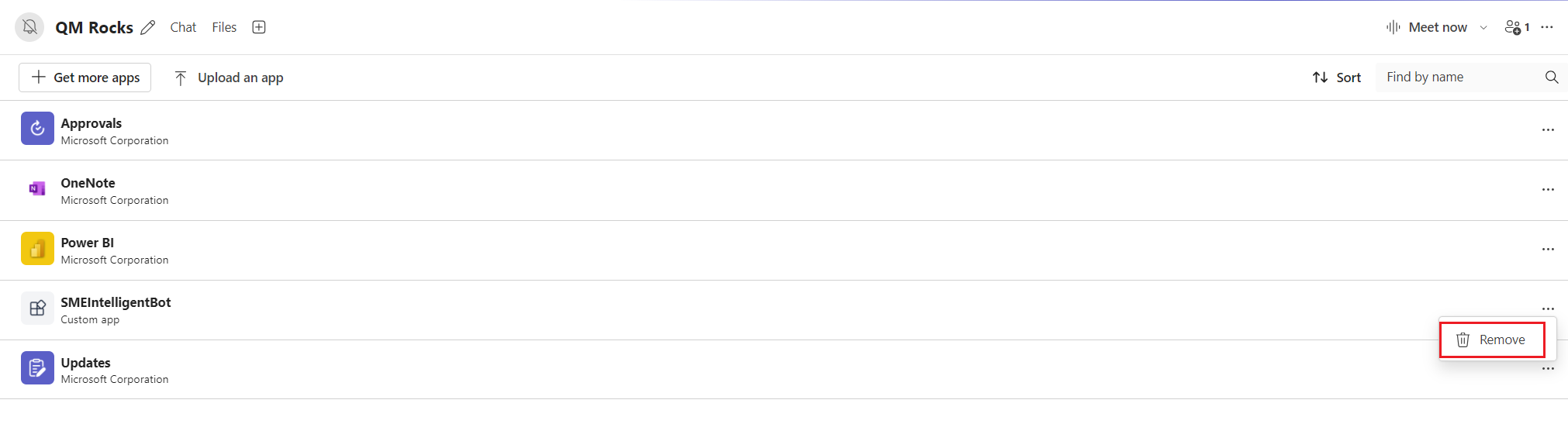
- Reinstall the Bot using the new installation package
Install to private chat (simply open this link, no need to install a zip file)
TIP
If error occurs like "You do npt have permission", please install via zip file.
https://teams.microsoft.com/l/chat/0/0?users=28:627426cf-6d3c-440b-9c88-a84edff2e469Install to group chat/channel (requires zip file installation)
Please follow instructions here. The Bot zip file has been updated there.
- Enter the command "test proactive message". If you receive a reply from the Bot, it means the migration is completed. If not, please enter the "update" command to update your profile and try again.

Some potential questions users might have:
- You only need to reinstall the Bot, you do not need to re-register your Team/Users/Features.
- If you have a groupchat/channel, you will need to re-register them to your Team after reinstallation.
- All features including
Auto Case Record to Excel Sharepointfeature will not be affected regardless of anyone in your team has reinstalled the Bot. - If you have any issue, please email smebotdl@microsoft.com.